A MacBook battery usually drains fast for one of three reasons: an app or background process using a lot of energy, settings that keep the Mac awake or the screen bright, or a battery that has simply worn out. Open Activity Monitor > Energy to see which apps are using the most power, then check System Settings > Battery > Battery Health to see if the battery itself is the problem.
This guide goes in that order, and it separates what applies to every Mac from what only applies to Intel Macs, so you do not waste time on steps your Mac does not need.
Is it the battery or the software?
Check the battery first, because no software fix helps a worn-out battery.
- Open System Settings > Battery and look at Battery Health. "Normal" means the battery is fine. "Service Recommended" means it holds less charge than when new.
- Check the cycle count: hold Option, click the Apple menu, choose System Information, then Power under Hardware.
Apple designs Mac batteries to keep up to 80% of their original capacity at their rated maximum cycle count, which is 1,000 on newer MacBooks and lower on some older ones. If your count is near the limit for your model, the battery is probably the cause. Our guide to checking Mac battery health and cycle count shows where each number lives and how to read it.
If the battery is healthy, the cause is software or settings. Keep reading.
How do I find what is draining my Mac battery?
Use Activity Monitor, which is built into every Mac.
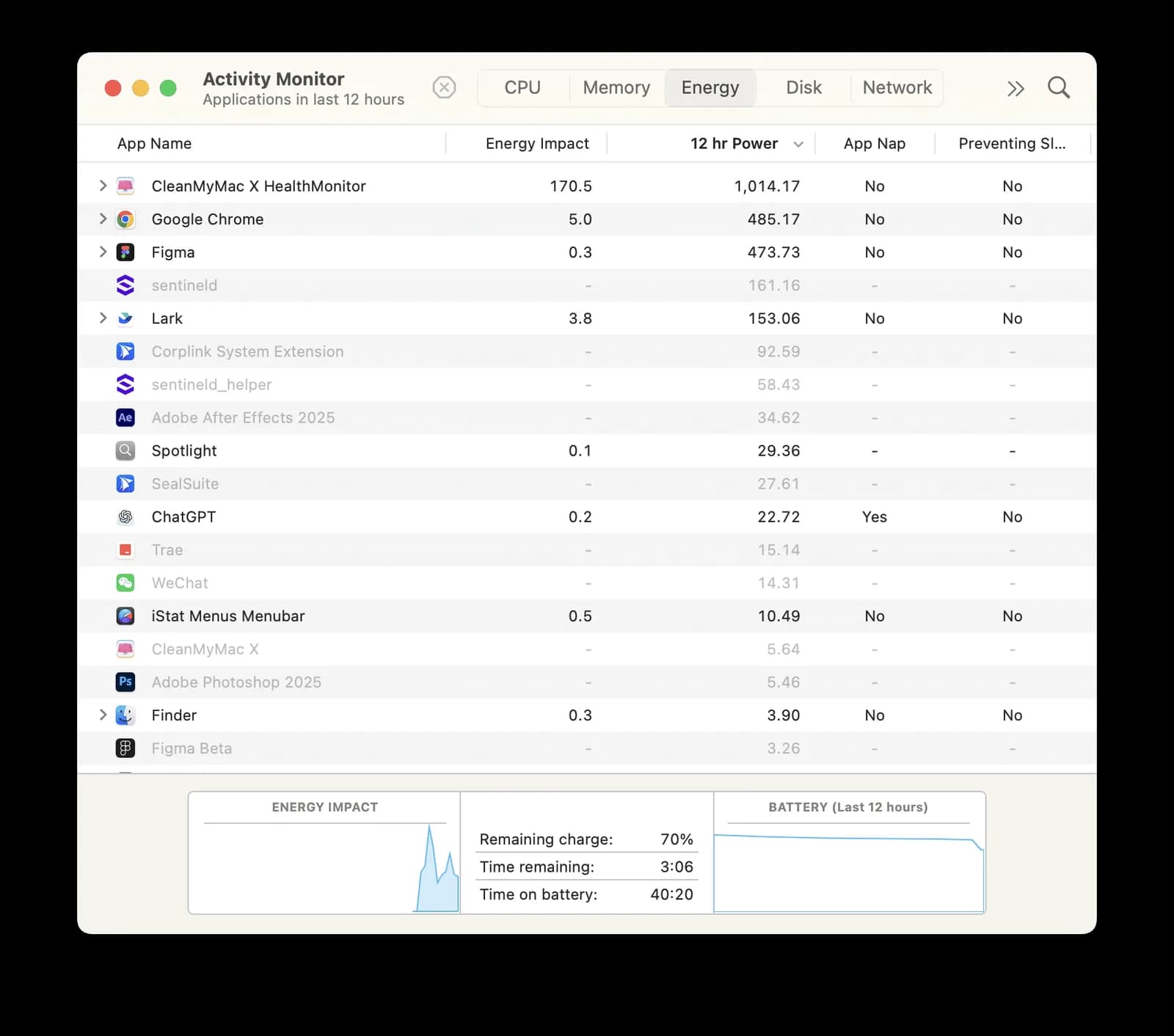
- Open Activity Monitor (Applications > Utilities, or search for it with Spotlight).
- Click the Energy tab.
- Click the Energy Impact column to sort the list.
Per Apple's Activity Monitor guide, Energy Impact is a relative value, and lower is better. On laptops there is also a 12 hr Power column showing the average over the last 12 hours, which is better for catching an app that misbehaves only now and then. Other columns show whether an app is preventing sleep, which matters if your battery drains overnight.
An app near the top that you are not actively using is your first suspect. Quit it, and see if the drain stops. Browsers with many tabs, video calls, cloud sync tools, and apps that keep running after you close their window are the usual offenders.
Why does my Mac battery drain when it is closed or asleep?
Something is keeping the Mac awake or waking it up. The most common causes are:
- Apps that prevent sleep. The "Preventing Sleep" column in Activity Monitor shows which ones. Media apps, backup tools, virtual machines and sync tools are typical.
- Connected accessories. External drives, hubs and phones can keep drawing power. Unplug them before you close the lid and see if the overnight loss changes.
- Background activity. Cloud sync, mail checks and update checks can wake the Mac.
- Network wake settings. Depending on your Mac, System Settings > Battery > Options may include settings such as "Wake for network access" or Power Nap. If you see them, try turning them off. Not every Mac has every option.
To see what is actually happening, open Terminal and run pmset -g assertions. It lists the processes currently holding the Mac awake. This is read-only, so it is safe to run.
Which settings reduce battery drain?
Apple's guide to optimizing your Mac's battery life covers the main ones. Some options may not be available, depending on your Mac.
- Low Power Mode: in System Settings > Battery, choose Always, Only on Battery or Only on Power Adapter.
- Display: lower the brightness, and in System Settings > Lock Screen set the display to turn off sooner on battery.
- Bluetooth and Wi-Fi: turn them off in System Settings when you do not need them.
- Accessories: disconnect unused ones, and quit apps you are not using.
Does Optimized Battery Charging work on Apple silicon Macs?
Yes. Optimized Battery Charging is not an Intel-only feature. Apple's support article lists macOS Big Sur 11 or later as the requirement, with no chip restriction. Find it in System Settings > Battery, then click the info button next to Battery Health or Charging. It learns your routine and delays charging past 80% until you are likely to need the battery, which slows wear.
Apple silicon Macs running macOS Tahoe 26.4 or later also have a Charge Limit (80% to 100%) in the same place. It lowers wear if your Mac is plugged in most of the day. Intel Macs do not get Charge Limit.
How do I clean up login items and background apps?
Apps that start with your Mac and keep running in the background are a common reason a battery drains faster than it used to. Go to System Settings > General > Login Items & Extensions. Per Apple, Open at Login lists what opens when you log in, and App Background Activity lists apps allowed to run tasks while closed, such as checking for updates or syncing. Switch off the ones you do not need.
If you have a long list and do not want to judge each item by hand, CleanMyMac can help here. This is a product we sell as an authorized MacPaw reseller. Its Performance module lists login items and background items, with a scan that suggests what to remove, according to MacPaw's own guides. You can see it in the CleanMyMac product page. You do not need it to do this job, since the System Settings list does the same thing, but it is quicker if you have many items.
How do I use Safe Mode to find a problem app?
Safe Mode loads only the essentials, so if your battery behaves normally there, a login item or third-party app is the likely cause. The way in depends on your chip, and Apple's Safe Mode guide gives these steps.
Apple silicon Mac:
- Shut down the Mac and wait until it is fully off.
- Press and hold the power button until the startup options screen appears.
- Select your startup disk.
- Hold Shift, click Continue in Safe Mode, and let the Mac restart.
Intel Mac: restart and immediately hold Shift until the login window appears.
In either case, you should see "Safe Boot" in the menu bar at the login window. Restart normally to leave Safe Mode.
Should I reset the SMC or NVRAM?
Only on an Intel Mac, and only as a last resort. Apple's SMC article says the SMC reset is for Intel-based Macs, and that on Apple silicon Macs the SMC resets automatically: plug the Mac in, then restart it or shut it down and turn it on again. Apple's NVRAM article says the NVRAM reset is for Intel-based Macs and does not apply to Apple silicon.
The steps depend on whether your Intel Mac has the T2 chip and whether it is a laptop or desktop, so follow Apple's pages rather than a remembered key combination. macOS 27 supports only Apple silicon Macs, so this section is only relevant if you are on an Intel Mac running an earlier macOS.
Does a clamshell setup or always-plugged-in use drain the battery?
It does not drain it, but it wears it. A MacBook that sits closed and plugged in at 100% for weeks ages faster, especially in a warm spot. Keep the Mac ventilated and turn on Optimized Battery Charging or, on Apple silicon with macOS Tahoe 26.4 or later, set a Charge Limit. A third-party app such as AlDente can add more control than Apple's single limit, but you no longer need one just to cap charging.
When is it a hardware problem?
If the cycle count is near the rated limit, Battery Health says Service Recommended, or the battery drains fast in Safe Mode too, the battery is likely worn. Apple recommends replacement at that point. Take the Mac to Apple or an Apple Authorized Service Provider. A very worn battery can swell, so do not keep using one that has visibly deformed the case or trackpad.
Whether the battery is healthy or not, a few habits help:
- Keep the Mac between 50°F and 95°F (10°C and 35°C).
- Store it at around 50% if you will not use it for a long time.
- Keep macOS and your apps updated, since fixes for power bugs ship in updates.
FAQ
Why is my Mac battery draining so fast all of a sudden?
Usually a new or misbehaving app, or a background process after an update. Sort Activity Monitor's Energy tab by Energy Impact and look at the 12 hr Power column on a laptop.
Why does my MacBook lose battery overnight with the lid closed?
Something is waking it or preventing sleep. Check the Preventing Sleep column in Activity Monitor, unplug accessories, and run pmset -g assertions in Terminal to see what is holding the Mac awake.
Is Optimized Battery Charging only for Intel Macs?
No. Apple lists macOS Big Sur 11 or later as the requirement and does not limit it to a chip type. It is in System Settings > Battery.
How do I start an Apple silicon Mac in Safe Mode?
Shut down, hold the power button until the startup options appear, select your disk, hold Shift and click Continue in Safe Mode.
Do I need to reset the SMC on an Apple silicon Mac?
No. Apple says it resets automatically. Plug the Mac in and restart it, or shut it down and turn it on again.
Should I keep Low Power Mode on all the time?
It is a good choice when you are away from a charger. It can slightly reduce performance, so many people use it only on battery. You can choose that in System Settings > Battery.
Can I replace a Mac battery myself?
Apple advises against repairs by untrained people or with non-genuine parts because they can affect safety and function. Use Apple or an Apple Authorized Service Provider.